

Throughout a site visitors peak, a request can sit in a queue on a saturated HyperPod cluster whereas GPUs on one other cluster, generally in one other AWS Area, sit idle. You have got already paid for that capability, however your requests can’t attain it.
In Introducing Amazon SageMaker HyperPod Inference Gateway, we confirmed how the Inference Gateway provides every Amazon SageMaker HyperPod cluster a single, GPU-aware endpoint. It reads real-time alerts corresponding to key-value (KV) cache utilization and queue depth to put each request on the best-suited pod. That solves routing inside one cluster, however not throughout clusters.
Right now, SageMaker HyperPod introduces the International Inference Gateway. It’s one SageMaker-managed gateway that routes throughout each cluster you register, in a single Area or throughout Areas. The gateway picks the cluster and carries the request over the AWS spine, with computerized failover and authentication by AWS Signature Model 4 (SigV4) and AWS Id and Entry Administration (IAM). Inside every cluster, the Inference Gateway retains selecting the pod, unchanged. The International Inference Gateway is the second tier of the structure we described partially 1.
The problem: Capability unfold throughout clusters and Areas
Fashions are getting bigger, and the GPU capability to serve them is more durable to seek out. To get sufficient of it, you unfold it throughout extra clusters and extra Areas.
Contemplate a crew that serves 4 fashions throughout 5 HyperPod clusters in two Areas. With out the Inference Gateway, shoppers monitor 20 endpoints: one per mannequin per cluster. The Inference Gateway cuts that to 5, one per cluster. However every shopper nonetheless picks a cluster itself.
That selection has prices:
- Uneven load. Throughout peaks, requests queue in a single Area whereas GPUs within the different Area are idle.
- Guide failover. When a cluster fails, an engineer adjustments configuration to maneuver site visitors away from it.
- Customized plumbing. Spreading site visitors throughout Areas means constructing and sustaining load balancers, DNS, and cross-Area networking your self.
The crew wants one endpoint that sends every request to the best-suited cluster and strikes site visitors off a failed cluster by itself.
Key advantages
The International Inference Gateway helps you get extra from the GPU capability you have already got, with much less to function.
- Put idle GPUs to work. Throughout a peak, requests overflow to clusters with accessible capability in the identical Area or one other one, as an alternative of queuing on a saturated cluster.
- Fail over routinely. When a cluster fails, the gateway strikes its site visitors to the next-best cluster. Purchasers don’t change something.
- Use one endpoint for all the pieces. Purchasers name a single SageMaker-managed endpoint as an alternative of monitoring one endpoint per cluster or per mannequin.
- Skip the customized networking. You don’t construct or preserve load balancers, DNS, or cross-Area networking.
- Keep non-public by default. Each request is authenticated with SigV4 and IAM, and it reaches your clusters solely over AWS PrivateLink.
Buyer suggestions
“At Bagelcode, we run our personal LLM inference service on AWS to assist groups throughout the corporate, together with our recreation groups, use AI to enhance how they work. In our beta assessments, the International Inference Gateway in Amazon SageMaker HyperPod routed requests throughout two AWS Areas by a single endpoint and saved serving them when one cluster might now not serve the mannequin. That gave our small platform crew cross-Area failover with out having to construct or preserve our personal routing layer.”
— Jinhyung Park, VP (AI Platform), Bagelcode
The way it works
Establishing the gateway takes two selections: which clusters to open up for routing, and which ones to group behind one gateway.
- Publish a cluster. You do that as soon as per cluster. You activate the
spec.globalRoutingblock within the cluster’s currentInferenceGatewayConfig. The HyperPod Inference controller then publishes the cluster privately from your personal account. - Create the gateway. You do that as soon as per gateway. You name
CreateGlobalInferenceGatewaywith the clusters to route throughout, and SageMaker returns one endpoint.
A cluster is reachable solely after you publish it. Whenever you publish a cluster, the controller creates a Community Load Balancer in entrance of the cluster’s Inference Gateway, publishes a digital non-public cloud (VPC) endpoint service on it, and uploads the listener’s certificates to your TLS bucket. These assets stay in your account. If you happen to listing a cluster in a gateway earlier than you publish it, the decision fails with a message that tells you what to repair.
How a request flows
Determine 1 exhibits the trail of every request: (1) your shopper indicators the request with SigV4 and sends it to the gateway’s regional endpoint. (2) The gateway authenticates the caller and picks the perfect cluster. (3) AWS PrivateLink carries the request to that cluster, in the identical Area or one other, and (4) the cluster’s Inference Gateway routes it to a mannequin pod, because it does at this time.
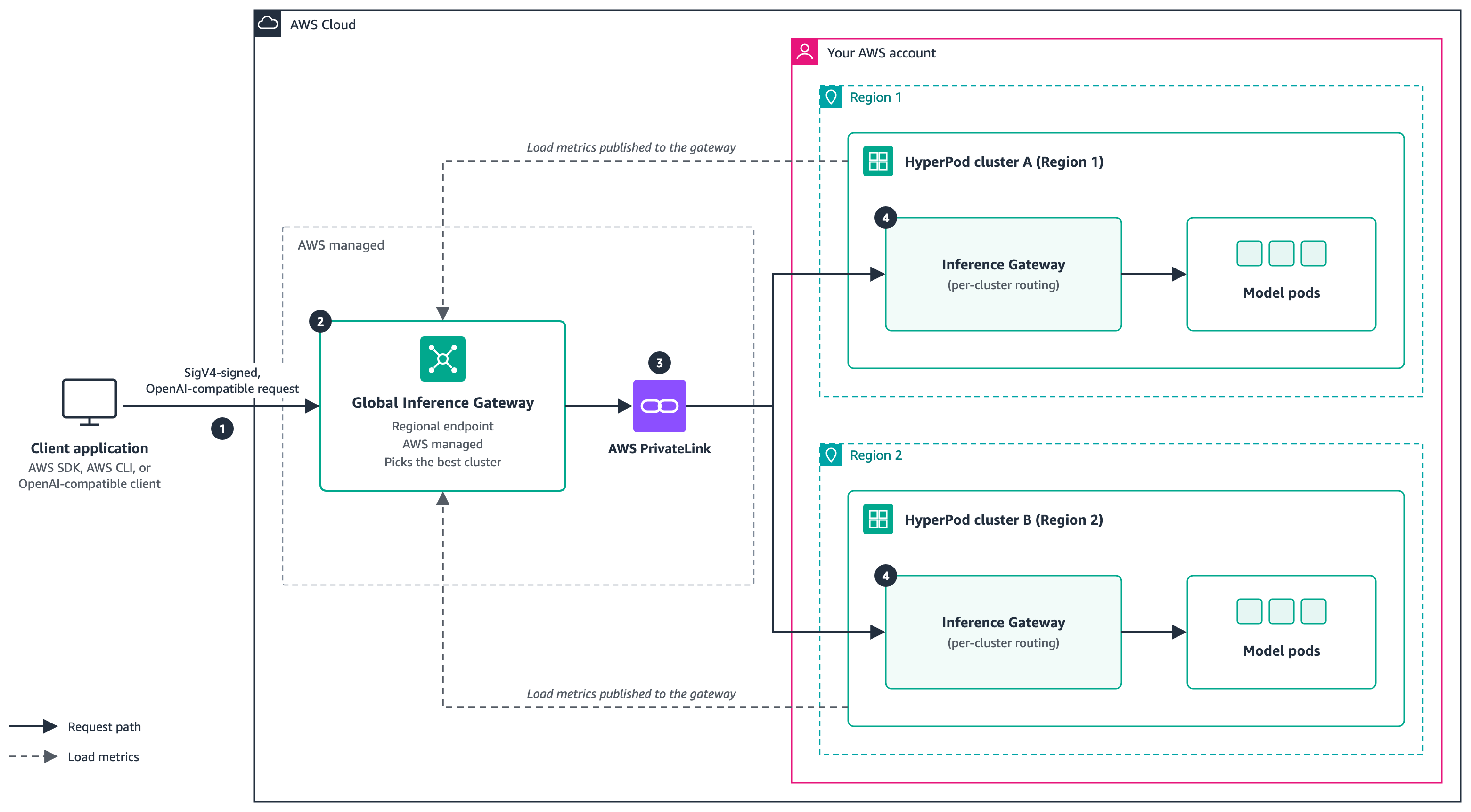
Determine 1: The International Inference Gateway receives every request at one regional endpoint and forwards it over AWS PrivateLink to the perfect HyperPod cluster, the place the cluster’s Inference Gateway routes it to a mannequin pod. Every cluster publishes its load again to the gateway.
What AWS operates
You determine which clusters to publish, which to group behind a gateway, and the way to weight routing. AWS operates the remaining:
- The routing fleet. SageMaker provisions and operates the fleet that terminates TLS, authenticates callers, scores clusters, and forwards every request.
- Non-public connectivity. SageMaker creates one non-public endpoint per cluster and carries site visitors on the AWS spine, in-Area and cross-Area.
- Certificates and validation. Utilizing an execution function that you simply create, the service reads every cluster’s VPC endpoint service identify, certificates, and Area, so that you don’t copy them by hand. It checks them earlier than routing site visitors.
- Well being and failover. The gateway health-checks each cluster and strikes site visitors off a failed cluster routinely. For particulars, see the Working the gateway part.
- Authentication and price limits. The gateway checks SigV4 signatures, IAM permissions, and price limits, and rejects failing requests earlier than any cluster sees them.
On every cluster, a service-managed metrics writer with its personal IAM function sends the cluster’s load to the gateway.
How the gateway picks a cluster
For every request, the gateway scores each wholesome cluster on 4 alerts and sends the request to the highest-scoring cluster. Every cluster’s metrics writer provides the load alerts.
You management how a lot every sign counts with routing weights. Every weight is a price from 0.0 to 1.0, and a weight of 0 turns that sign off. If you happen to set weights, you set all 4, and so they should add as much as 1.0. If you happen to omit them, the defaults within the following desk apply.
| Weight | What it scores | Default |
KVHeadroom |
Out there KV cache and GPU reminiscence on the cluster | 0.20 |
QueueDepth |
How backed up the cluster is | 0.25 |
RegionProximity |
Distance between the cluster and the gateway’s Area | 0.40 |
ErrorRate |
Latest failed requests on the cluster | 0.15 |
The defaults favor clusters near the gateway’s Area, whereas nonetheless transferring site visitors towards clusters with accessible capability and away from clusters which are failing. If resilience issues greater than proximity on your workload, elevate ErrorRate and decrease RegionProximity. For instance, the next routing block weights latest errors at 0.7:
You cross the weights within the Routing parameter of CreateGlobalInferenceGateway, and you may change them later with UpdateGlobalInferenceGateway.
Select your place to begin
Your path will depend on what you run at this time. If you happen to serve from a single cluster, keep on that cluster’s Inference Gateway endpoint. Transfer to the International Inference Gateway whenever you add a second cluster.
| Start line | What you do | Consequence |
| The Inference Gateway runs on every cluster, for instance 4 fashions on 5 clusters in us-east-1 and us-west-2 | Replace the add-on, publish every cluster, and create the gateway | One endpoint for each cluster. Per-cluster endpoints preserve serving when you transfer shoppers over. |
| The HyperPod Inference add-on runs with the Inference Gateway turned off | Activate the Inference Gateway with one add-on replace and one InferenceGatewayConfig per cluster, add a scheduler for every mannequin, then observe the primary row |
Per-model endpoints collapse into one |
| GPU capability in two Areas, however no HyperPod Inference setup but | Create a HyperPod cluster in every Area with the HyperPod Inference add-on, deploy your mannequin, activate the Inference Gateway, then observe the primary row | One endpoint from day one, with site visitors whose routing will be fine-tuned, and retains serving if a Area has an issue |
Getting began
To arrange the International Inference Gateway, you put together every cluster, create an execution function, and name CreateGlobalInferenceGateway. You then ship OpenAI-compatible requests, signed with SigV4, to the gateway endpoint. For step-by-step directions, together with the IAM roles and insurance policies, see the AWS documentation.
Safety and entry
Each request to the gateway is signed with SigV4 and licensed with IAM. Callers want permission to invoke the gateway, and streaming has its personal motion:
Connect this coverage to every IAM id that sends requests. To permit each gateway within the account, use global-inference-gateway/* because the useful resource.
The execution function follows least privilege. It may possibly describe solely the clusters you listing, attain solely their Amazon Elastic Kubernetes Service (Amazon EKS) API, and skim solely the routing certificates underneath the gig/ prefix of your TLS bucket, tagged as created by HyperPod Inference.
Id tokens. In case your clusters examine JSON Internet Tokens (JWTs), cross the token with --customer-identity-token (the X-Amzn-SageMaker-Buyer-Id-Token header), with no Bearer prefix. The token travels contained in the SigV4 signature, so an unsigned token is rejected with 403 and a repeated token with 400. Activate JWT checks on each cluster that serves a mannequin, or on none of them, so a request doesn’t succeed on one cluster and fail on one other.
Requests attain your clusters solely by AWS PrivateLink, as proven in Determine 1. The gateway doesn’t log or retailer prompts or completions.
Working the gateway
Listed here are steps to configure the gateway.
Add a cluster
Put together the brand new cluster and create the execution function’s EKS entry entry on it, as described within the documentation. Additionally add the brand new cluster to the Useful resource lists of the execution function’s permissions coverage. Then name AddInferenceGateway within the gateway’s Area, even when the brand new cluster is in one other Area:
The gateway validates the cluster and begins routing to it as soon as it’s wholesome. The endpoint, different clusters, and shoppers aren’t affected.
Detach a cluster
Name RemoveInferenceGateway within the gateway’s Area:
The gateway stops sending new requests to the cluster, lets in-flight requests end, and removes the non-public endpoint. A gateway all the time retains no less than one cluster. To withdraw the cluster totally, set globalRouting.enabled: false in its InferenceGatewayConfig and reapply it.
Delete the gateway
Name DeleteGlobalInferenceGateway:
The gateway endpoint stops serving, and per-cluster endpoints preserve serving. After the gateway is deleted, withdraw every cluster with globalRouting.enabled: false, then delete the execution function and the IAM permissions you added for world routing.
The next desk summarizes how widespread occasions and adjustments have an effect on site visitors.
| Occasion | What occurs | What you do |
| Gateway creation fails | The gateway strikes to FAILED, and FailureReason says what failed, corresponding to a certificates identify mismatch |
Repair the trigger. To see every cluster’s standing, name ListInferenceGateways. |
| A cluster fails | Visitors strikes to the next-best cluster, and the cluster returns step by step after it recovers. A failed request is retried as soon as on one other cluster until it has began streaming. If no wholesome cluster is left, the gateway returns 503. | Nothing. Purchasers don’t change something. |
| Change routing weights | New requests use the brand new weights, and in-flight requests end underneath the outdated ones. Nothing is re-provisioned. | Name UpdateGlobalInferenceGateway |
| Add a cluster | Routing begins as soon as the cluster is wholesome. Nothing else adjustments. | See Add a cluster |
| Detach a cluster | New requests cease, and in-flight requests end | See Detach a cluster |
| Delete the gateway | The gateway endpoint stops serving, and per-cluster endpoints preserve serving | See Delete the gateway |
For any troubleshooting help, please see the Troubleshooting Information.
Finest practices and issues
- Plan your teams earlier than you publish. Determine which clusters sit behind every gateway, with the identical
modelNameon each cluster that ought to share a mannequin’s site visitors. In order for you peak site visitors to overflow throughout Areas, give clusters in each Areas headroom. - Publish solely the clusters you add to a gateway. A broadcast cluster that isn’t in any gateway receives no site visitors, however its Community Load Balancer nonetheless runs and is billed.
- Cowl each mannequin. Every scheduler within the
InferenceGatewayConfigmaps a mannequin identify to the pods that serve it. A mannequin that isn’t in any scheduler can’t be reached by the gateway, and requests for it return a 404 error. - Maintain your add-on configuration full. With
--resolve-conflicts OVERWRITE, an incomplete configuration can reset your load balancer or TLS settings. Begin from the present configuration each time. - Cross
--contexton eachkubectlcommand. You’re employed throughout a number of clusters, so make certain every command runs towards the cluster you imply. - Maintain a workload in a single Area when it is advisable. Create a gateway that features solely clusters in that Area.
Conclusion
On this put up, we launched the Amazon SageMaker HyperPod International Inference Gateway: one SageMaker-managed endpoint throughout your HyperPod clusters, in a single Area or a number of. The gateway picks the cluster based mostly on KV cache headroom, queue depth, Area proximity, and error price, and strikes site visitors off a failed cluster with no shopper adjustments.
The International Inference Gateway is offered in 13 AWS Areas: US East (N. Virginia), US East (Ohio), US West (N. California), US West (Oregon), South America (São Paulo), Europe (Frankfurt), Europe (Eire), Europe (London), Europe (Stockholm), Asia Pacific (Tokyo), Asia Pacific (Mumbai), Asia Pacific (Singapore), and Asia Pacific (Sydney).
To get began, see the AWS documentation.
Concerning the authors