

Preserving a shared Slurm cluster for basis mannequin improvement in sync entails retaining a number of individually maintained items of configuration matched to what’s operating on the nodes. The cluster’s form lives on a number of configuration information, its software program in customized scripts, its community topology in information that have to be edited as nodes change, and its customers in a roster that an administrator should keep and rerun. Over time these items drift away from what’s truly operating, and nothing tells you once they do.
We consider cluster configurations must be managed the way in which you handle the remainder of your AWS infrastructure. You declare what you need by an API or the console, AWS validates it earlier than it’s utilized, the cluster is saved in that state repeatedly, and you’ll see whether or not it’s working. Throughout 2026, Amazon SageMaker HyperPod introduced that strategy to Slurm clusters, with API-driven Slurm configuration, AMI-based configuration, steady provisioning, automated topology administration, and deep well being checks. Right this moment, we launched cluster extensions, which deliver the identical strategy to the software program and settings on operating nodes, with managed extensions for observability and consumer administration. Nevertheless, by all of it, you continue to maintain full entry to each node in your cluster, together with the controller node. You possibly can SSH in, configure nodes straight, and run your individual lifecycle scripts. The APIs provide you with much less to take care of, direct entry offers you extra management, and also you select the stability.
On this submit, we stroll by the options we launched in 2026 and clarify why the software program on operating nodes wanted a unique mechanism. We then present how cluster extensions work, by each the API and the console, and comply with a platform staff by 1 / 4 on a cluster that makes use of them.
A declarative basis for Slurm cluster operations
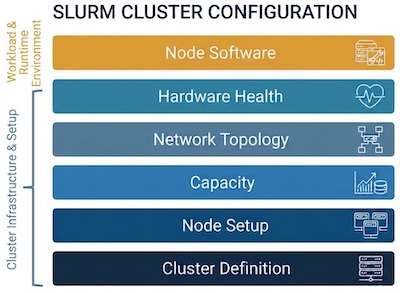
We will consider a Slurm cluster’s configuration grouped into six layers. 5 of them describe the cluster itself: its definition, node setup, capability, community topology, and {hardware} well being. The sixth covers the software program operating on its nodes, which we focus on within the subsequent part. The next determine exhibits the six layers.
Earlier in 2026, we introduced declarative administration to the primary 5 layers. With API-driven Slurm configuration, directors outline node roles, partitions, and Amazon FSx for Lustre and Amazon FSx for OpenZFS mounts in CreateCluster and UpdateCluster requests, and join an exterior accounting database. HyperPod updates partition settings whereas preserving different controller-node Slurm customizations. AMI-based configuration replaces routine setup scripts with photographs preconfigured with Slurm, Docker, Enroot, Pyxis, and residential directories. A customized AMI or OnInitComplete script handles organization-specific software program. Steady provisioning for Slurm retries capability requests within the background; AMI-based configuration works with it, minimal capability necessities let groups specify MinInstanceCount, and cluster operations observe scaling requests.
Computerized topology administration maintains the community structure as nodes scale or are changed. On Slurm 25.11 or later, partition-level topology helps tree or block topology per partition. For {hardware} well being, on-demand deep well being checks stress GPUs and take a look at NVIDIA Collective Communications Library (NCCL) connectivity, whereas deep well being checks with steady provisioning run as nodes are provisioned. Nodes underneath verify keep in Slurm upkeep reservations till checks end, retaining jobs off them.
Introducing cluster extensions
The 5 layers described to date are configurations that HyperPod can derive or apply as soon as, when it provisions a node. The sixth layer, the software program that runs on the nodes, behaves in a different way as a result of it retains altering for the lifetime of the cluster. As researchers be a part of and depart, a staff asks for deeper GPU metrics for every week, and an exporter ships a repair. For this layer, lifecycle scripts have been the principle mechanism to date, they usually have drawbacks when the software program retains altering. A script runs solely when a node is provisioned, so every change means modifying it after which changing nodes or rerunning it throughout the fleet. A mistake exhibits solely when the script runs on a node, and nothing stories what’s put in, so nodes drift aside over time.
We wished the software program to be declared in a single place, checked while you submit it, saved constant throughout nodes, and visual afterward. In November 2026, we launched cluster extensions, that are software program packages managed by AWS that you just set up, configure, replace, and take away by APIs or the Amazon SageMaker AI console, beginning with observability and consumer administration, together with listing integration, as the primary software program extensions. In contrast with scripts, extensions have these benefits:
- Validated up entrance: HyperPod checks an extension’s settings in opposition to its schema while you submit them, by the API or the console, so a misspelled setting is rejected earlier than something reaches a node.
- Constant on each node: HyperPod applies the extension to each node, together with nodes added by scale-up or substitute, and retains the nodes constant because the cluster scales and heals.
- Modified by the API or the console: You alter a setting or improve a model with an API name, or from the SageMaker AI console, as a substitute of modifying scripts and changing nodes. Each paths use the identical validated configuration, and this submit exhibits console screenshots alongside the API examples.
- Seen: Every extension stories its standing and per-node well being.
Use cluster extensions when HyperPod affords a managed software program functionality. Use customized AMIs and lifecycle scripts for organization-specific software program or initialization that the accessible extensions don’t cowl. HyperPod helps two cluster managed extensions in the present day:
- The observability extension (sagemaker-observability) collects node, GPU, Elastic Material Adapter (EFA), Slurm job, and Slurm cluster metrics and sends them to Amazon CloudWatch or Amazon Managed Service for Prometheus.
- The consumer administration extension (sagemaker-user-management) creates customers and teams with the identical IDs on each node, controls who can use SSH and sudo on every node kind, and registers customers with Slurm accounting. It could additionally join the cluster to Lively Listing, for instance AWS Listing Service for Microsoft Lively Listing.
The next diagram exhibits how an extension reaches your nodes.
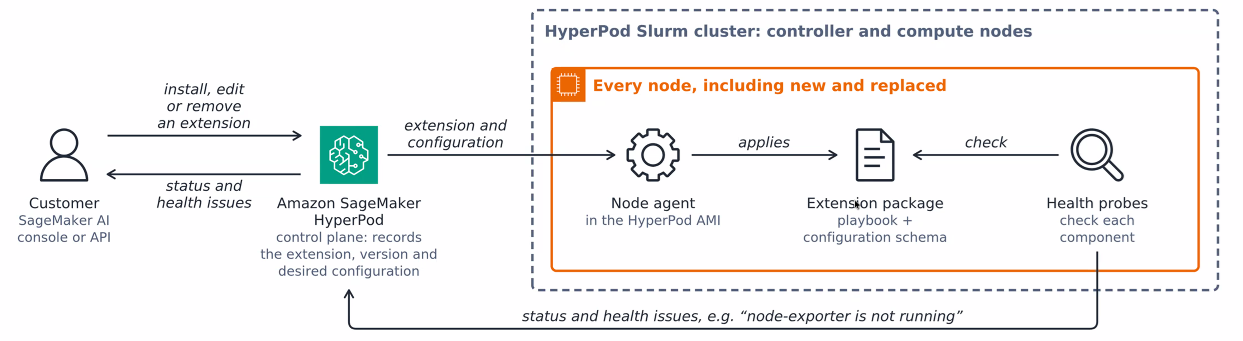
Determine 2: HyperPod can set up, edit, or take away an extension. HyperPod information the specified configuration, a node agent applies the extension package deal on each node, together with new and changed ones, and well being probes report standing and well being points again
Utilizing cluster extensions
You need to use cluster extensions from the SageMaker AI console or by an API. On the console, the Extensions tab on a cluster’s particulars web page lists every extension with its standing, model, and ARN, and it’s the place you put in a brand new one. Every extension provides controls of its personal, such because the metric retailer and an open dashboard in Grafana button for observability, and the variety of customers and teams and a Handle customers button for consumer administration. You can even handle each extension by APIs, from the AWS CLI or an SDK, to script installs, maintain settings in model management, repeat a setup throughout clusters, or verify standing and well being from your individual tooling. The next desk lists the six cluster extension APIs, from putting in an extension to itemizing the variations you possibly can improve to, together with console view for extensions.
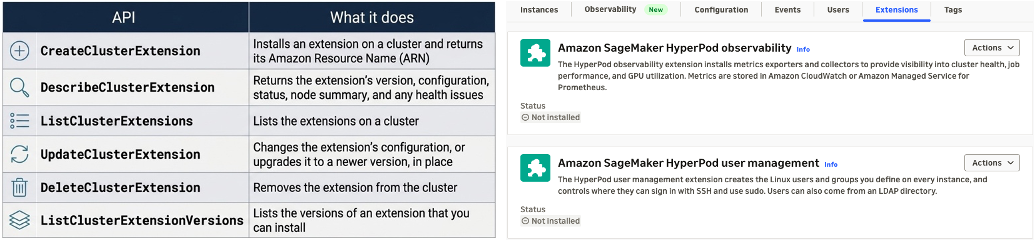
Determine 3: Left, the six cluster extension APIs and what every one does. Proper, the console view so as to add and take away extensions
The next diagram exhibits what occurs after you name one in every of these APIs.
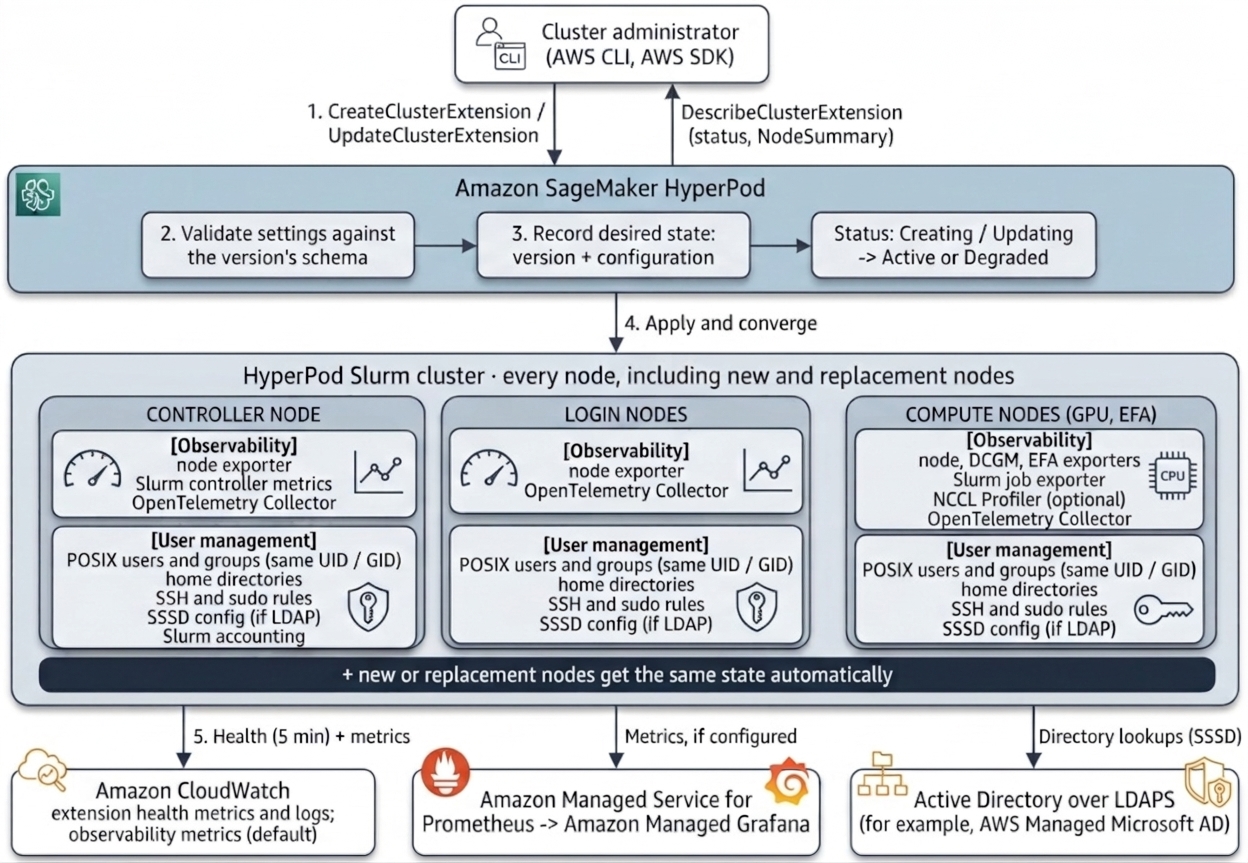
Determine 4: You declare an extension’s model and settings by the API. HyperPod validates and information them, applies them to each node for its function, and stories standing and well being
Once you create or replace an extension, HyperPod validates your settings in opposition to the model’s schema through the API name, so a misspelled setting is rejected instantly. It then information the model and settings as the specified state and applies them, with every node putting in solely what its function wants, corresponding to GPU exporters on GPU nodes solely. New and substitute nodes get the identical state a couple of minutes after they begin, and each node stories whether or not the extension utilized and whether or not it’s wholesome.
Updates ship solely the settings that you just need to change, and HyperPod merges them into the saved settings. Issues that present up solely on a node, corresponding to a port or consumer ID that one thing else already makes use of, seem within the Well being area of DescribeClusterExtension, grouped by trigger with a code, a message, and a depend of affected nodes. HyperPod retries inner failures by itself, and for the rest you repair the trigger and name UpdateClusterExtension with no adjustments to retry the affected nodes.
An extension’s standing is Creating or Updating whereas a change rolls out, Lively when each node runs the requested model and settings and none stories an issue, and Degraded when some nodes failed or report an issue. Every extension has its personal ARN, so a platform staff can personal sagemaker-user-management whereas a monitoring staff owns sagemaker-observability. Every well being situation names the part, describes the impact in your cluster, offers the subsequent step, and counts the affected nodes, so you possibly can see the place to look with out signing in to every node, as the next determine exhibits.
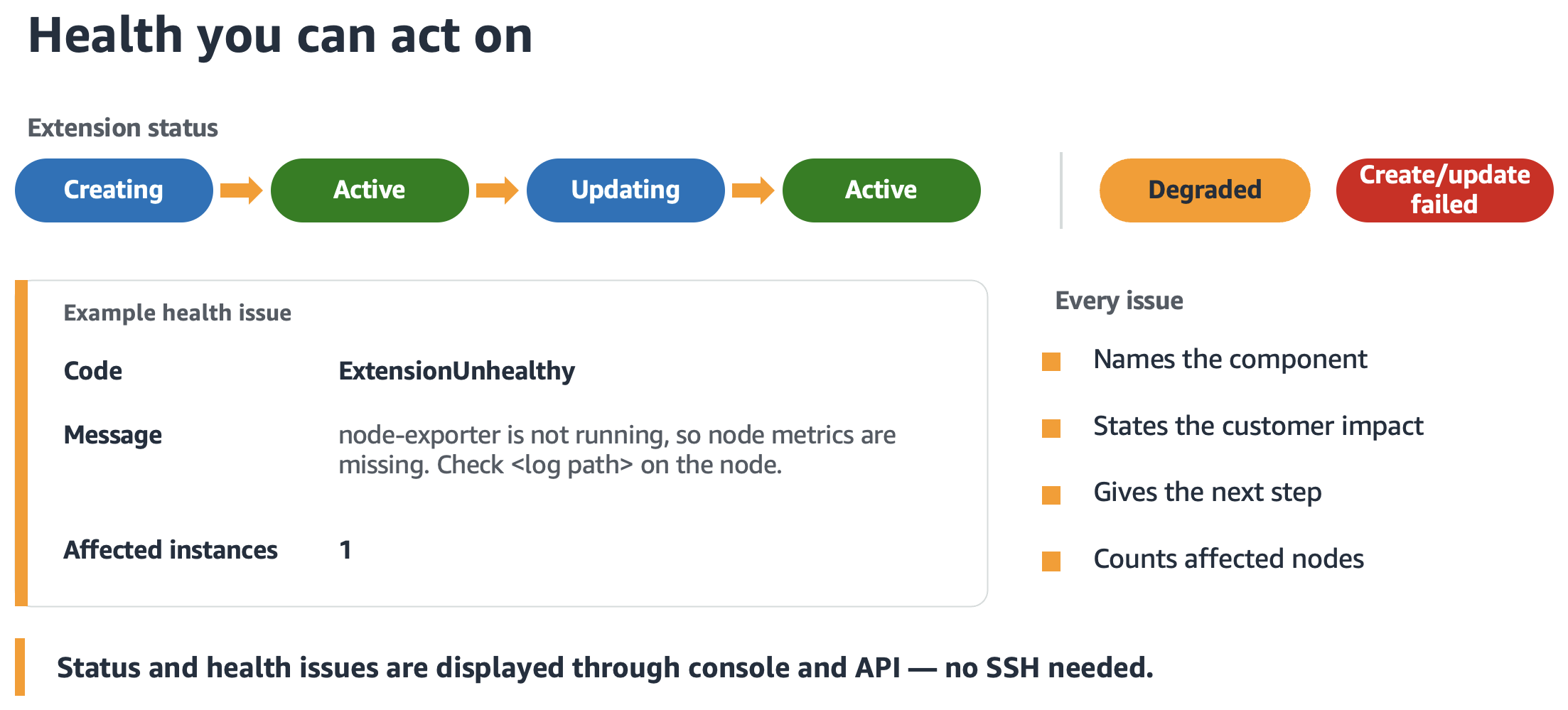
Determine 5: An extension’s standing, and an instance well being situation for a node exporter that isn’t operating
When to make use of cluster extensions and when to make use of lifecycle scripts
A helpful method to determine is to ask who owns the software program and the way usually it adjustments. Among the software program on a cluster is restricted to your group, corresponding to safety brokers, license servers, and the storage structure your information pipeline expects. Lifecycle scripts and customized AMIs are the fitting instruments for it, as a result of solely your staff is aware of what it wants. The remaining is software program that just about each cluster wants, like GPU and job metrics and consumer accounts with constant IDs and entry guidelines. That software program should match on each node and retains altering, so cluster extensions are the higher match, since you declare it as soon as, HyperPod validates it, and every extension stories whether or not it’s wholesome.
The 2 approaches can coexist, however every part ought to have one proprietor. Don’t handle the identical exporter, consumer, or service by each a lifecycle script and an extension, as a result of competing configurations could cause set up or runtime conflicts. Cluster extensions work with each lifecycle configuration choice.
When you already run these capabilities from scripts, you possibly can transfer to extensions one functionality at a time, and scripts and extensions can run facet by facet when you do. For every functionality, the migration takes 4 steps:
- Name UpdateClusterSoftware to maneuver the cluster to the November 2026 HyperPod AMI or later.
- Flip the aptitude off in your lifecycle scripts and add them to your S3 bucket, in order that new nodes skip it.
- Throughout a deliberate upkeep window, cease and take away the script-installed brokers on each node. That is the one handbook, fleet-wide step.
- Name CreateClusterExtension to put in the extension on the clear cluster.
If something is left behind, the set up names the battle, corresponding to a port that’s already in use, and DescribeClusterExtension exhibits it underneath Well being. With consumer administration, you retain the identical usernames and consumer IDs. The next determine exhibits 4 steps.

Determine 6: Shifting an current cluster from lifecycle scripts to extensions, one functionality at a time
What you could get began with cluster extensions
You want a HyperPod Slurm cluster on or after the November 2, 2026 HyperPod AMI or later with steady provisioning enabled. An extension runs software program as root on each node, so deal with CreateClusterExtension, UpdateClusterExtension, and DeleteClusterExtension as administrator permissions. We recommend that you don’t grant them to the cluster’s execution function, as a result of each consumer who can sign up to the nodes can use its credentials. That function does want entry to the locations that the extensions use, which suggests Amazon CloudWatch or aps:RemoteWrite for observability and secretsmanager:GetSecretValue for the Lively Listing secrets and techniques that consumer administration reads. If these secrets and techniques are encrypted with a buyer managed AWS Key Administration Service (AWS KMS) key, the function additionally wants kms:Decrypt on that key. Consumer administration additionally wants a shared file system, corresponding to Amazon FSx for Lustre, for house directories.
For procedures, IAM insurance policies, and configuration references, see Cluster extensions for Amazon SageMaker HyperPod Slurm clusters within the Amazon SageMaker AI Developer Information.
A platform staff’s journey managing a shared Slurm cluster utilizing cluster extensions
To see how cluster extensions are utilized in apply, contemplate a platform staff that manages a shared Slurm cluster for a number of analysis teams. The staff wants a reviewable cluster definition, GPU and job metrics, company listing entry, native accounts for a associate lab, and separate possession of observability and consumer administration. The next examples present how the staff configures these capabilities and responds to routine adjustments and failures.
Create the cluster from one definition
The administrator declares the entire cluster, together with node roles, partitions, FSx mounts, minimal capability, deep well being checks, and the exterior accounting database, in a single CreateCluster request. For an entire instance request, see Getting began with SageMaker HyperPod utilizing the AWS CLI.
The request has no lifecycle configuration, topology file, or Slurm configuration file. Every SlurmConfig offers its occasion group a task, and the GPU group joins the practice partition. AMI-based configuration units up the nodes, and the safety staff’s compliance agent is already within the customized AMI. The GPU group asks for 8 nodes and requires 6, so jobs can begin as quickly as 6 are prepared whereas HyperPod provisions the remaining and well being checks every GPU node because it arrives. HyperPod selects tree topology for the P5 nodes by itself, and accounting writes to an Amazon Relational Database Service (Amazon RDS) database that the staff owns. The administrator can nonetheless SSH into the controller node to examine or tune Slurm straight.
Set up observability
Management needs GPU and job metrics, so the administrator installs the observability extension. Within the SageMaker AI console, on the cluster’s Extensions tab, the administrator chooses the observability extension, picks the metric classes and their ranges and the gathering interval, and selects one in every of two metric shops: Amazon CloudWatch or Amazon Managed Service for Prometheus. The next screenshot exhibits the set up kind with one retailer chosen. The opposite choice is out there in the identical area.
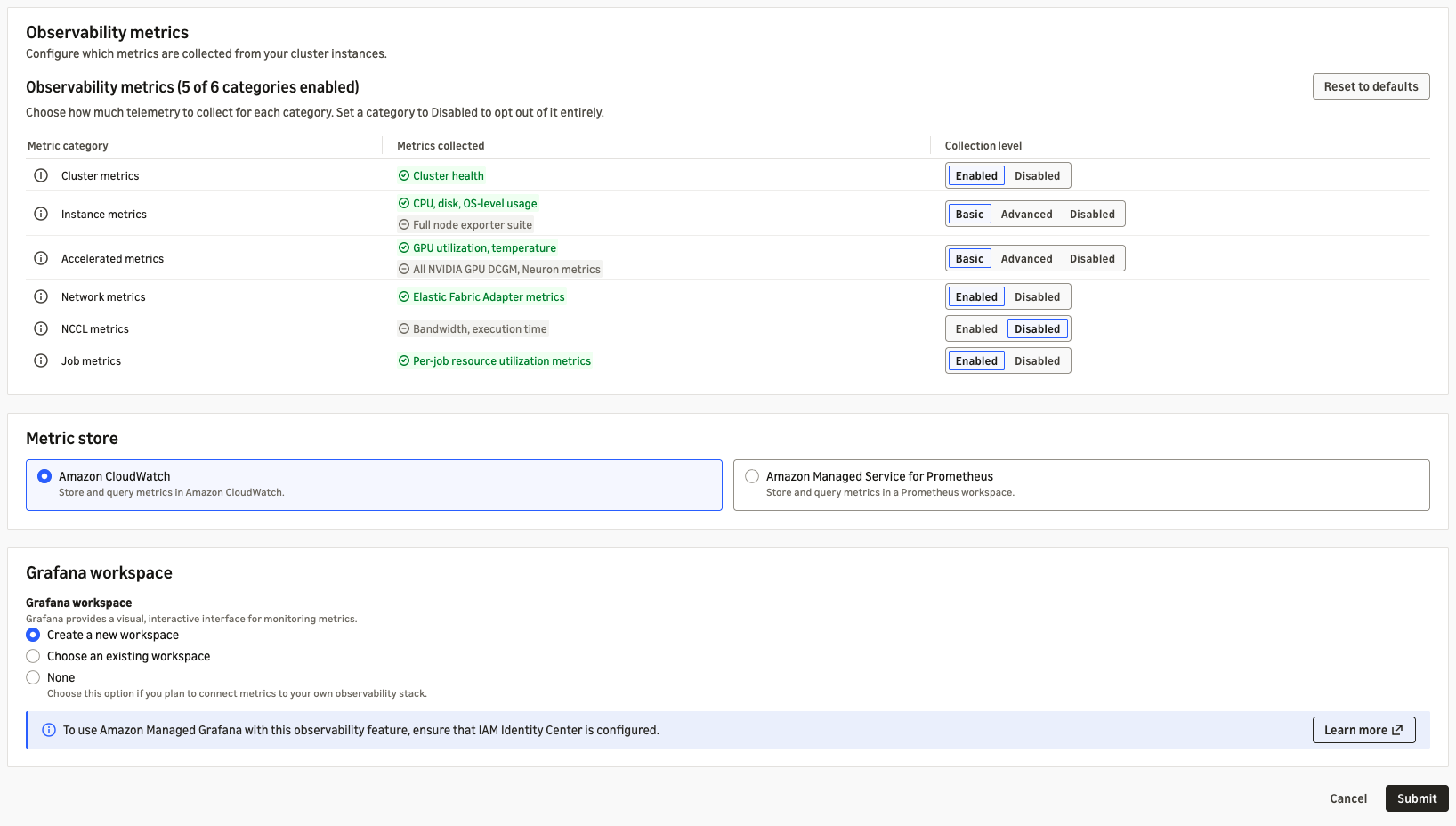
Determine 7: Putting in the observability extension from the console, with configurable metric ranges and a selection of metric retailer
The identical set up by the API takes one create-cluster-extension name. The next instance makes use of Amazon CloudWatch because the metric retailer. To ship metrics to Amazon Managed Service for Prometheus as a substitute, you set the Prometheus vacation spot in the identical configuration.
The administrator installs the extension with one create-cluster-extension name:
The decision returns the extension’s ARN, which the administrator makes use of in later calls:
Whichever manner it’s put in, every node runs solely the elements related to its function, corresponding to DCGM and EFA exporters on GPU nodes and Slurm cluster metrics on the controller. Schema errors are rejected earlier than rollout, whereas node-specific conflicts seem in extension well being.
After the set up, the extension seems on the cluster’s Extensions tab with its model, standing, and ARN. The screenshot exhibits the tab for a cluster that has each the observability and consumer administration extensions put in, and each are Lively.
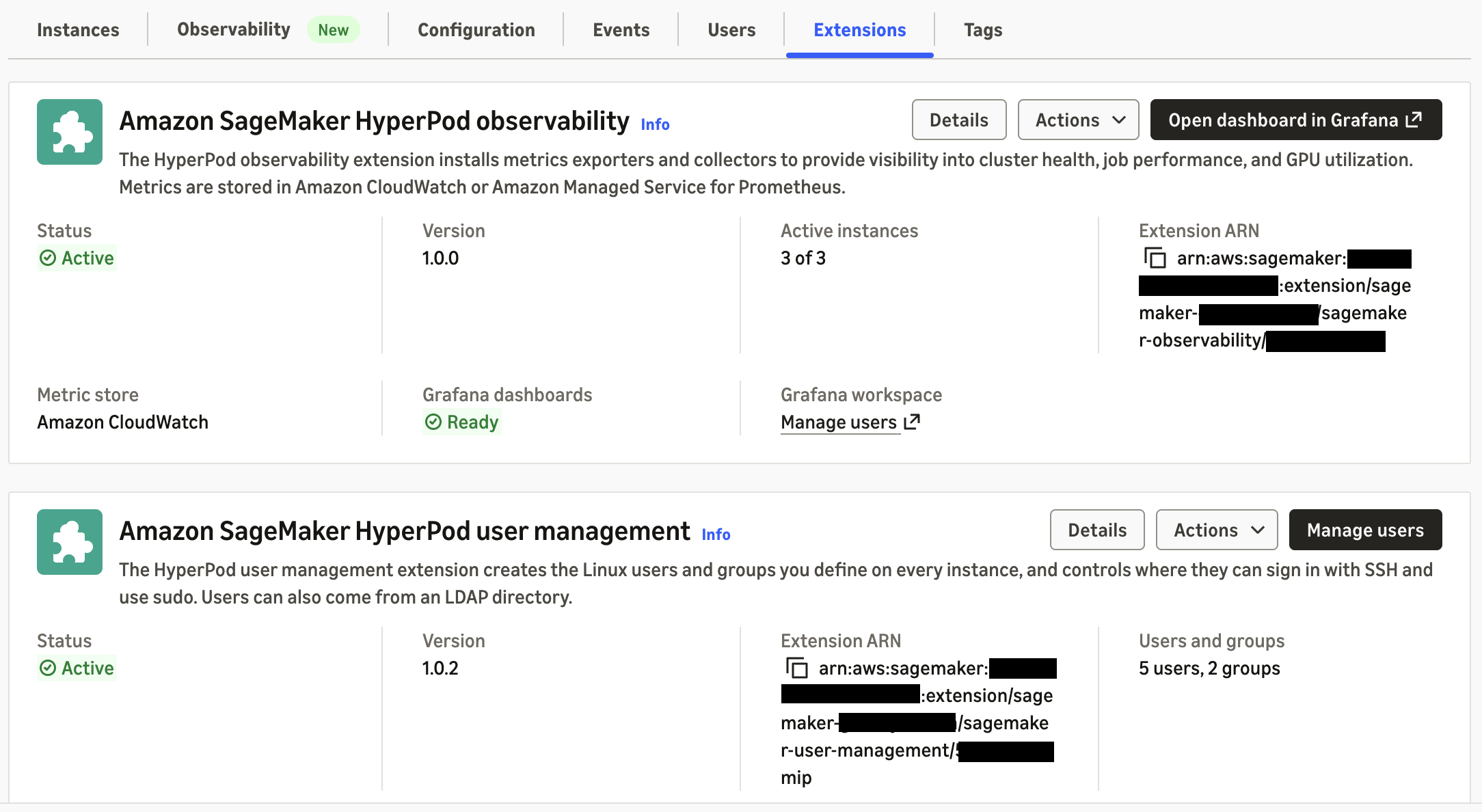
Determine 8: The Extensions tab for a cluster with each the observability and consumer administration extensions put in
Whichever metric retailer you select, you possibly can add an Amazon Managed Grafana workspace to the set up, so the staff doesn’t have to construct dashboards from scratch. After signing in to Grafana, they discover two pre-created dashboards, Clusters and Jobs, as proven within the following screenshot.
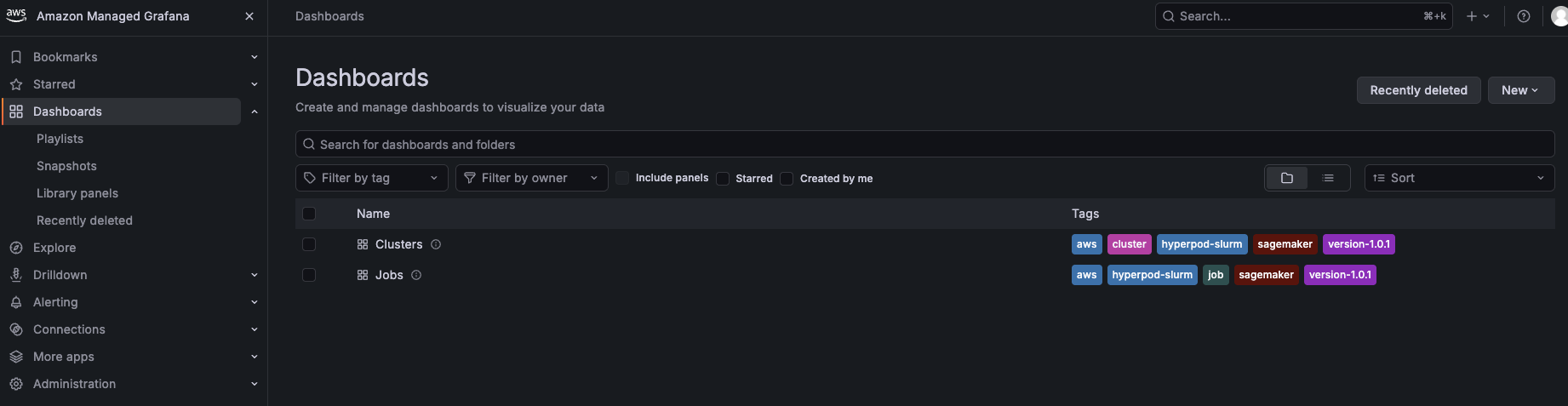
Determine 9: The Clusters and Jobs dashboards that include the observability extension in Amazon Managed Grafana
The Clusters dashboard offers a single view of your HyperPod Slurm clusters, constructed on the metrics that the extension collects and sends to your chosen metric retailer. On the prime, it summarizes cluster well being: occasion depend and well being, GPU and GPU reminiscence totals, vCPUs, reminiscence, and Amazon FSx for Lustre capability. It additionally exhibits the state of Slurm itself, together with node states (idle, allotted, combined, down, and draining), job queues, failed or preempted jobs, and scheduler exercise. From there, you possibly can filter by cluster, node, or GPU to drill into EFA networking, GPU efficiency and errors, and host-level CPU, reminiscence, disk, and community metrics, as proven within the following screenshots. That allows you to go from “is my cluster wholesome?” to the foundation reason for a difficulty with out leaving the dashboard.
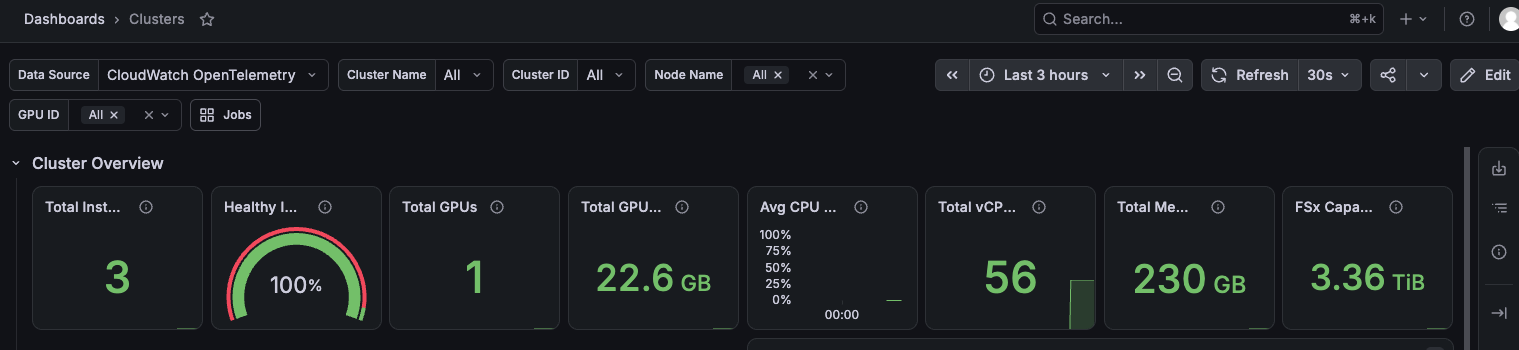
Determine 10: The Clusters dashboard, from cluster-wide well being and Slurm state all the way down to per-node GPU, EFA, and host metrics
The Jobs dashboard strikes from cluster-level well being all the way down to particular person Slurm jobs. It ties every job’s useful resource to make use of again to the job itself, utilizing metrics from the Slurm job exporter in both metric retailer. You possibly can filter by cluster, job ID, job title, partition, consumer, or account, and see CPU, reminiscence, GPU utilization, GPU reminiscence, and disk I/O for every job, plus accelerator and NCCL metrics. That makes it simpler to identify underused GPUs, caught jobs, or communication bottlenecks in distributed coaching, as within the following screenshot.
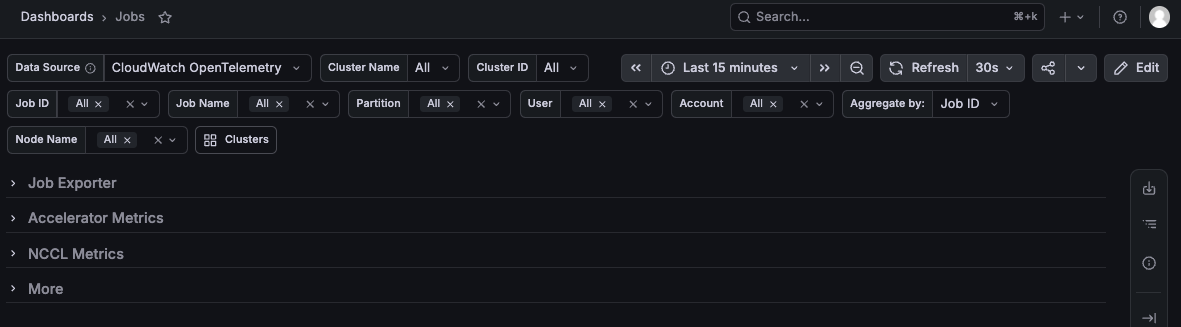
Determine 11: The Jobs dashboard, exhibiting useful resource use for particular person Slurm jobs
Activate deeper GPU and NCCL metrics
Later, a analysis staff that’s tuning multi-node coaching asks for extra element, so the administrator sends solely the settings to alter:
HyperPod merges these settings into the saved configuration and applies them to each node, restarting solely the elements whose settings modified. When the investigation is over, setting each to null returns them to their defaults, and at no level are nodes changed or scripts rerun.
Repair a metrics supply downside
One morning the extension exhibits as Degraded. A brand new occasion group has an execution function that lacks aps:RemoteWrite, and describe-cluster-extension exhibits the impact:
As soon as the administrator provides the permission, the nodes report wholesome and the extension returns to Lively, with nothing to reinstall.
Give individuals entry
The consumer administration extension manages the Linux customers and teams on each node, and who can sign up and use sudo on every node kind. You declare who ought to exist and what they’ll do, and HyperPod applies it to each node, together with nodes added later or changed, so nobody connects to nodes or runs scripts so as to add or take away a consumer. Customers come from native accounts that you just checklist within the configuration, from Lively Listing over LDAPS, or from each, and every group names the node varieties (controller, login, or compute) the place its members can sign up over SSH and the place they get passwordless sudo.
For the platform staff, safety needs company identities, with sudo reserved for directors, and a associate lab that isn’t within the listing wants accounts of its personal. The administrator declares each sources in a single configuration, with group guidelines that say which node varieties every group can sign up to and use sudo on:
Entry is express, so after the extension is put in solely the teams that grant SSH entry, together with the default ubuntu consumer, can sign up. Listing customers maintain their identities and group membership in Lively Listing, whereas the associate lab’s customers get the identical IDs, house directories, and the default Slurm root account.
The identical configuration might be managed from the console. Selecting Handle customers on the consumer administration extension opens the cluster’s Customers tab, the place the administrator can add, edit, and take away teams and customers, and set which node varieties every group can sign up to and use sudo on, as proven within the following screenshot.
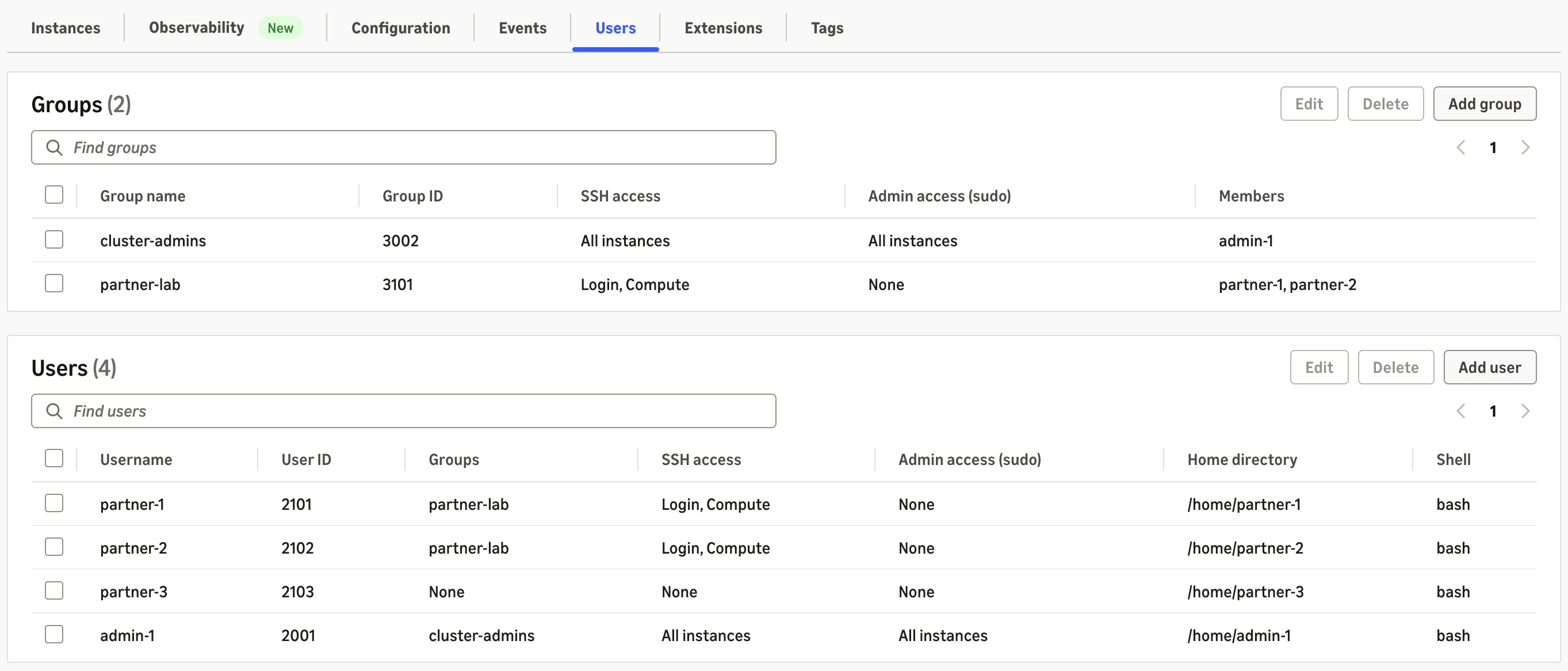
Determine 12: Managing teams and customers for the consumer administration extension on the console
Improve an extension to get new options with out AMI updates
When AWS publishes a brand new model of an extension, the administrator lists the variations that may be put in and upgrades in place with out AMI updates:
HyperPod checks the saved settings in opposition to the brand new model’s schema and rejects the request, altering nothing, in the event that they aren’t legitimate for it. In any other case, the brand new model rolls out to each node, and nodes that be a part of later get it too. Upgrades solely go ahead, so the administrator picks a upkeep window. Any new settings or capabilities that include the model can then be turned on with an replace like the sooner one.
Scale the cluster and exchange failed nodes
Earlier than the end-of-quarter run, the administrator begins an on-demand deep well being verify on the GPU group after which provides nodes with batch-add-cluster-nodes. The request returns as quickly as HyperPod accepts it, so the administrator follows it as a cluster operation:
As capability arrives, every node is well being checked, joins Slurm, takes its place within the topology, and will get each extensions with the identical model and settings as each different node. If a GPU fails through the run, the substitute is configured and picks up the extensions the identical manner.
Evaluate who has entry
On the finish of the quarter, safety asks who has sudo on the controller, and the administrator solutions from the API with out signing in to a node:
The reply is cluster-admins and ClusterAdmin@instance.com, and the listing group’s membership is audited within the listing. As a result of every extension has its personal ARN, the platform staff’s function can replace solely sagemaker-user-management and the monitoring staff’s function solely sagemaker-observability, whereas safety has read-only entry to each. None of those permissions belongs on the cluster’s execution function. When an extension is Lively, ActiveCount equals TotalCount, and Well being is empty, each node runs precisely that configuration.
Availability and pricing
Cluster extensions, together with the observability and consumer administration extensions, have been accessible since November 2026 in all of the areas the place Amazon SageMaker HyperPod is supported, and the opposite enhancements on this submit had been introduced earlier in 2026, with every announcement itemizing its Areas. There’s no extra cost for cluster extensions. You pay for the AWS assets that you just use with them, corresponding to Amazon CloudWatch, Amazon Managed Service for Prometheus, and AWS Secrets and techniques Supervisor.
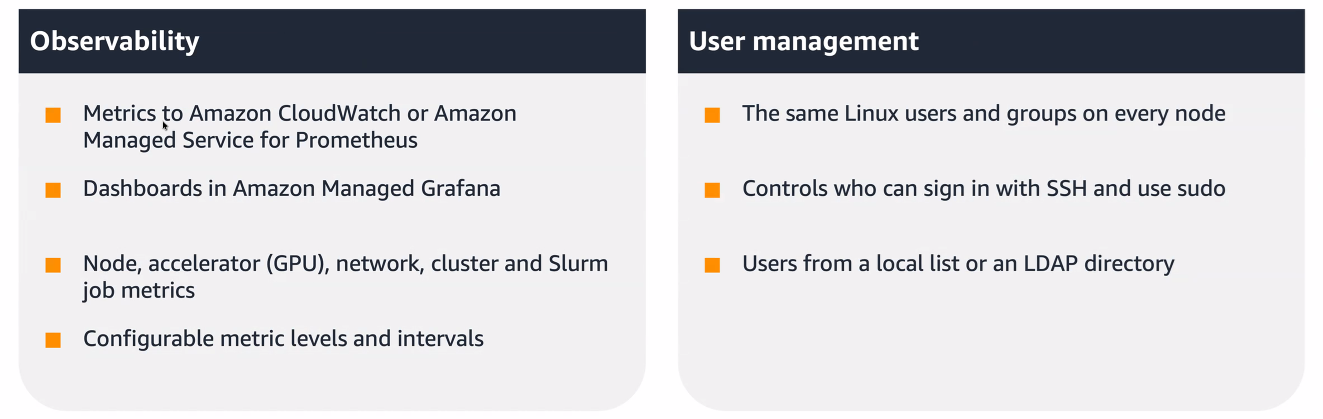
Determine 13: The 2 extensions which have been accessible since November 2026
Conclusion
A cluster is less complicated to run when extra of it’s declared, validated, converged, and observable. This yr’s enhancements introduced that to a HyperPod Slurm cluster’s definition, node setup, capability, community topology, and {hardware} well being, and cluster extensions, accessible since November 2026, deliver it to the software program on the nodes, the layer that adjustments most frequently. Lifecycle scripts and customized AMIs keep targeted on what’s particular to your group, and the controller node stays yours.
To create a cluster as described on this submit, see Getting began with SageMaker HyperPod utilizing the AWS CLI. To get began with cluster extensions, see Cluster Extensions within the Amazon SageMaker AI Developer Information. Share your suggestions within the feedback or by your AWS account staff.
Acknowledgment
This function has contributions throughout a number of groups. Among the individuals concerned in creating this embody Hengyu Lou, Aman Pratap Singh, Karthick Ravi, Shubh Nisar, Nitish Sai Kommasai, Uday Singamala, Min Badar, Devanshi Desai, Yahya Hassan, Connie Chen, Kashish Tayal, Oleg Talalov, Takuma Yoshitami, Kiran Penta, Dhawal Parkar, Pradeep Cruz.
Concerning the authors